Official Product from STROBOFACTORY
PKPassport for Mac
Couldn't load pickup availability
Please Review Before Purchase
- Please review the product details, system requirements, and terms of use before purchasing.
- Shipping policy
- Refund policy
- If you have any questions, please contact us through the CONTACT page.
Create ZIP files with Windows-compatible filenames.
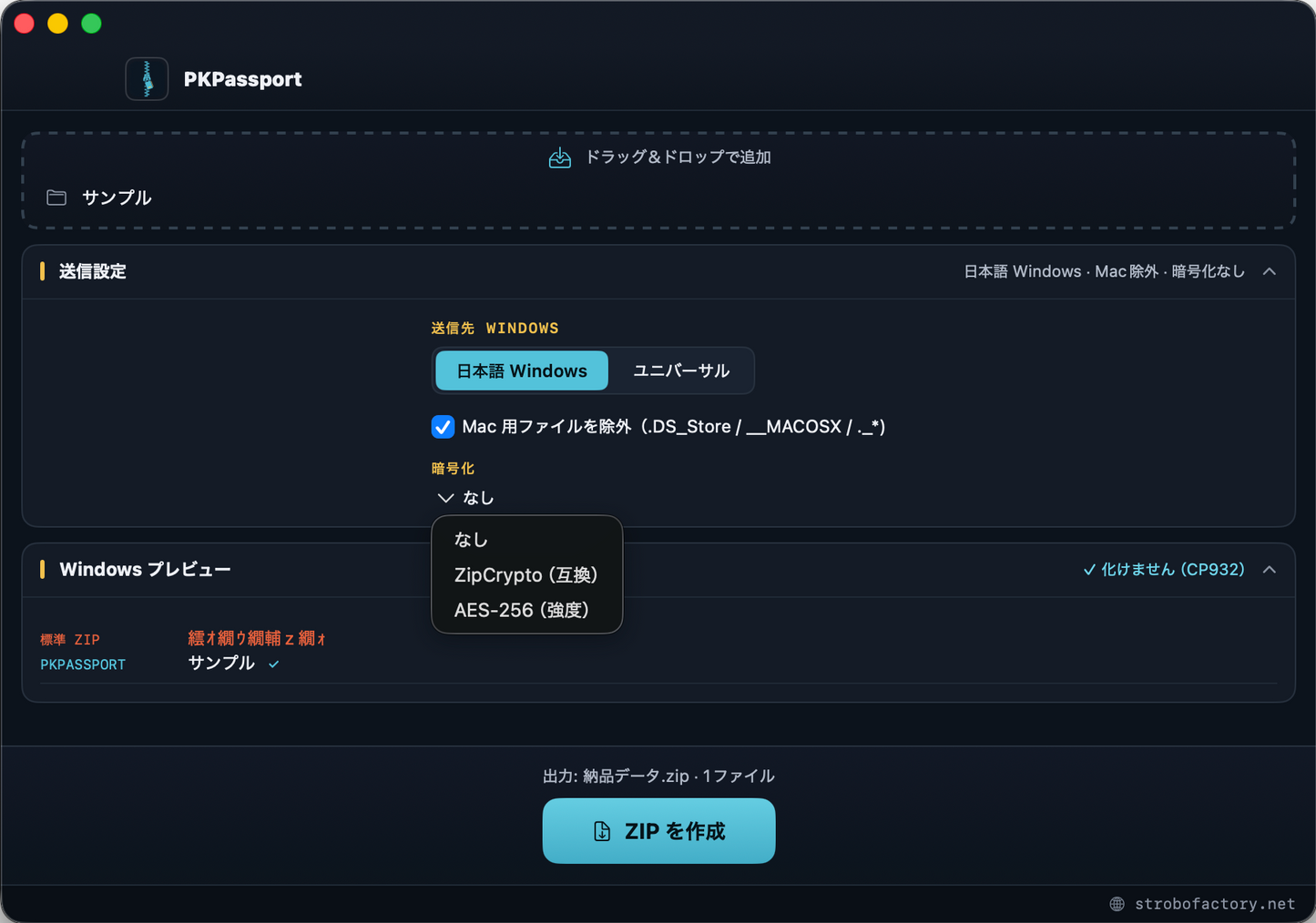
PKPassport is a tool focused solely on helping reduce garbled filenames when ZIP files created on a Mac are opened on Windows. It also automatically removes unnecessary Mac-specific files (.DS_Store / __MACOSX / ._*) included by Finder’s standard ZIP feature. Before sending, you can preview on screen how the files will appear on the recipient’s Windows computer. Results may depend on the recipient's extraction software and settings.
Main Features
- Filename Encoding Options — Optimizes filenames for the recipient (Japanese Windows = CP932 / other languages = UTF-8). Choose the appropriate encoding for your recipient
- Removes Mac Files — Automatically excludes .DS_Store / __MACOSX / ._*. Keeps the recipient’s folder clean
- Windows Preview — Preview on the spot how files will appear on the recipient’s Windows computer before sending
- AES-256 Encryption — Strong password protection compatible with 7-Zip / WinRAR / Keka. Compatibility-focused ZipCrypto is also available
- Instant Drag and Drop — Simply drop files or folders. The ZIP is saved next to the original data
Designed for Peace of Mind
- Your original data remains unchanged. The ZIP is created next to the original files
- Nothing is sent to a server. Everything is completed locally on your Mac
- Apple-notarized. Install without Gatekeeper warnings
The Origin of the Name — Every ZIP Begins with the Two Letters PK
If you open a ZIP file in a binary editor, the first two characters are always “PK” (hexadecimal 50 4B). This is not decoration. They are the initials of Phil Katz, the engineer who created the ZIP format in 1989.
At the time, companies used separate proprietary compression formats that could not decompress one another’s files. He released ZIP as a compression format that anyone could use freely and made its specification open. That is why, nearly 40 years later, ZIP remains a “common language” that can be opened on Windows, Mac, Linux, and virtually every environment around the world. You can casually send a ZIP today because he did not monopolize the format.
In reality, however, one small border remained: ZIP files that were supposed to open anywhere could garble Japanese filenames when moved from Mac to Windows. PKPassport was created to remove that final border. It is a “Passport” that allows files to travel correctly from Mac to Windows without their names becoming garbled. And the two letters PK still quietly watch over every ZIP from its beginning. The name is a small tribute to Phil Katz, who made ZIP the world’s common language.
About Your Purchase
One-time purchase of ¥1,980 (not a subscription). We will send you a download link after purchase.
System requirements: macOS 14 Sonoma or later (Apple Silicon / Intel supported)
Frequently Asked Questions
Is this a Windows application?
No. PKPassport runs on a Mac to create ZIP files for recipients using Windows.
How does it handle Japanese filenames?
Choose CP932 or UTF-8 based on the recipient. Results may depend on the recipient's ZIP extraction software and settings.
Are filename encoding and encryption different settings?
Yes. Filename encoding uses CP932 or UTF-8, while password protection uses AES-256 or ZipCrypto.
Are original files changed or uploaded?
No. ZIPs are created next to the original files, and processing takes place locally on your Mac.
Are there shipping charges?
No. This is a digital download with no physical shipping.
How do I request support or review refunds?
Review the refund policy before purchasing and use the CONTACT page for assistance.
Share